This new free 'bit-perfect' Hi-Res Audio player for Mac was apparently a 'nightmare' to make, but could become the lossless player of your dreams
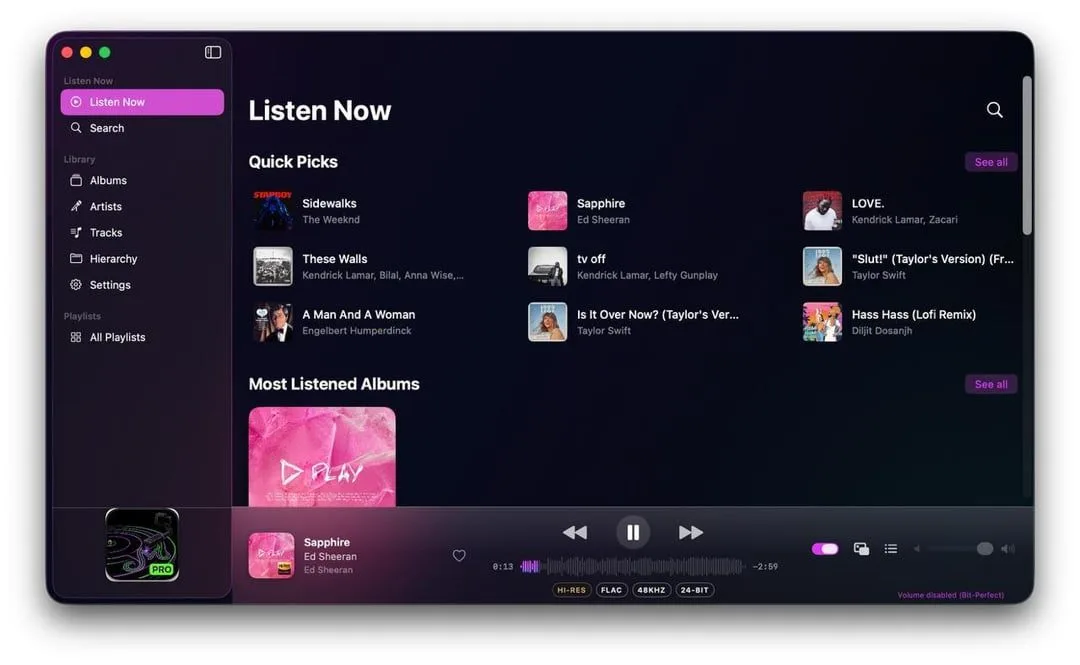
A new Mac music player called YM Pro has been released on the Mac App Store and promises 'bit perfect' playback It bypasses macOS' system mixer to connect directly to your DAC Changes the DAC to match the file, not the other way around PCM audio only, requires Apple Silicon If you're looking for a hi-res music player for your Mac that can make the most of your external audio equipment, YM Pro could be just what you're looking for.
It's free, open source, available on the Mac App Store, and offers an interesting alternative to Apple's way of doing things, especially if you use an external DAC .
And while it's very much a work in progress it's got lots of potential.
Developer Yonesh Murugan has posted details of the app to r/audiophile .
Getting it approved was apparently a "nightmare" because the app takes exclusive control of your audio hardware, something App Store reviewers weren't too happy about.
But it's now approved and live, although there are a few rough edges still.
The key difference between YM Pro and other apps is that it bypasses the system mixer completely, connecting directly to your DAC and automatically switching its sample rate to the file you're playing, up to 192kHz.
It also has "hog mode", which turns off all your system sounds and other audio while you're listening.
YM Pro audio player: what works, and what needs work The "bit-perfect" claim is about how the app handles music playback.
Rather than up- or downsampling audio files to match your DAC's set bitrate, it adjusts your DAC to match the audio file's resolution — and does it directly, without any other software resampling as it passes through the OS, so your audio should remain pure.
Although YM Pro's core mission is to play hi-res, bit-perfect FLAC files, which the Apple Music app doesn't do (Apple wants you to use its ALAC equivalent instead), it also handles common formats including MP3 and WAV.
It's purely for PCM formats, not DSD, and it requires Apple Silicon (as does macOS 27 , which launches imminently).
The app doesn't connect to your Music library; instead, you point it to the folder containing the music you want it to catalog and play.
That folder can be the one containing your existing Music library, but it lacks auto-scanning and auto-updating so you'd need to keep it up to date manually.
5News aggregated this summary from the outlet’s public feed. The full article, with all the context, is on www.techradar.com — the content belongs to TechRadar.