How to make Xfce look like almost any desktop you want
PART 1 Xfce is one of the oldest and smallest desktops, but it's also one of the most malleable: it can look and work like multiple other OSes.
Best of all, an optional extra Xfce tool automates away most of the configuration.
Xfce has been around for 30 years, undergoing several facelifts while remaining one of the most configurable and lightweight Linux desktops.
It started off looking like CDE, then it evolved into something more like Windows 95 before developing its own identity.
The good news, though, is that you don't have to spend hours right-clicking and twiddling options to give it a whole new look.
It has its own tool for this, called Panel Profiles.
It's an optional extra that does the same job as Zorin OS's Appearance tool: it lets you flip between predefined desktop layouts in two clicks.
It works on the fly, without even requiring you to log out, and you can also define and save your own custom layouts.
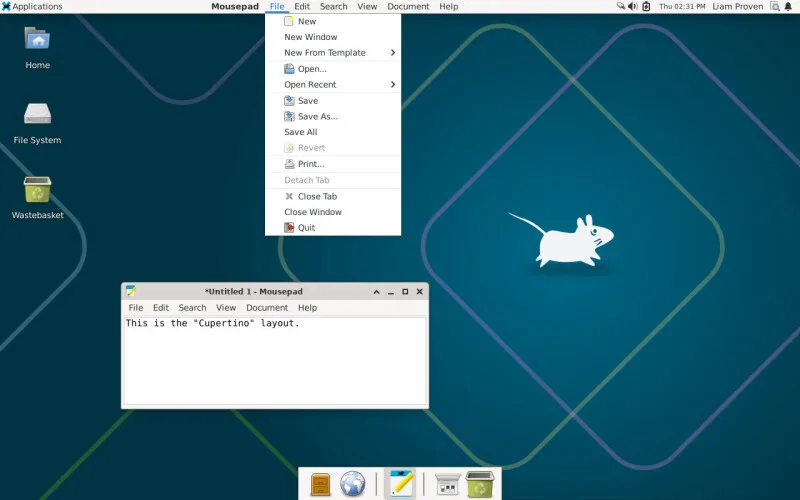
With Panel Profiles, you can make Xfce resemble various versions of Windows, Xubuntu, Xfce itself, MATE (or GNOME 2, if you're nostalgic), Mac OS X, or Ubuntu Unity.
In Part 1 of this two-part workshop, we'll show you how to install Panel Profiles and the extra components that let it really flex Xfce's muscles.
To get the most out of some of the more unconventional layouts, you do need to do a little under-the-hood reconfiguration, and in part 2 we'll cover how to do that: it involves adding a few lines to plain-text files and doing a little manual point-and-click panel tweaking.
Before the Qt advocates start shouting at us, it's true that KDE Plasma can do most of this too.
The difference is that, as far as we've been able to find, KDE has no automatic layout-switching tool, while Xfce's Panel Profiles does most of the grunt work for you.
In KDE, you'll have to DIY ("Do It Yourself," for non-Brits) and learn to navigate KDE's hundreds of settings in dozens of dialog boxes.
5News aggregated this summary from the outlet’s public feed. The full article, with all the context, is on www.theregister.com — the content belongs to The Register.