Creality Falcon A1C review: I was instantly impressed with this compact, affordable, beginner-friendly laser engraver
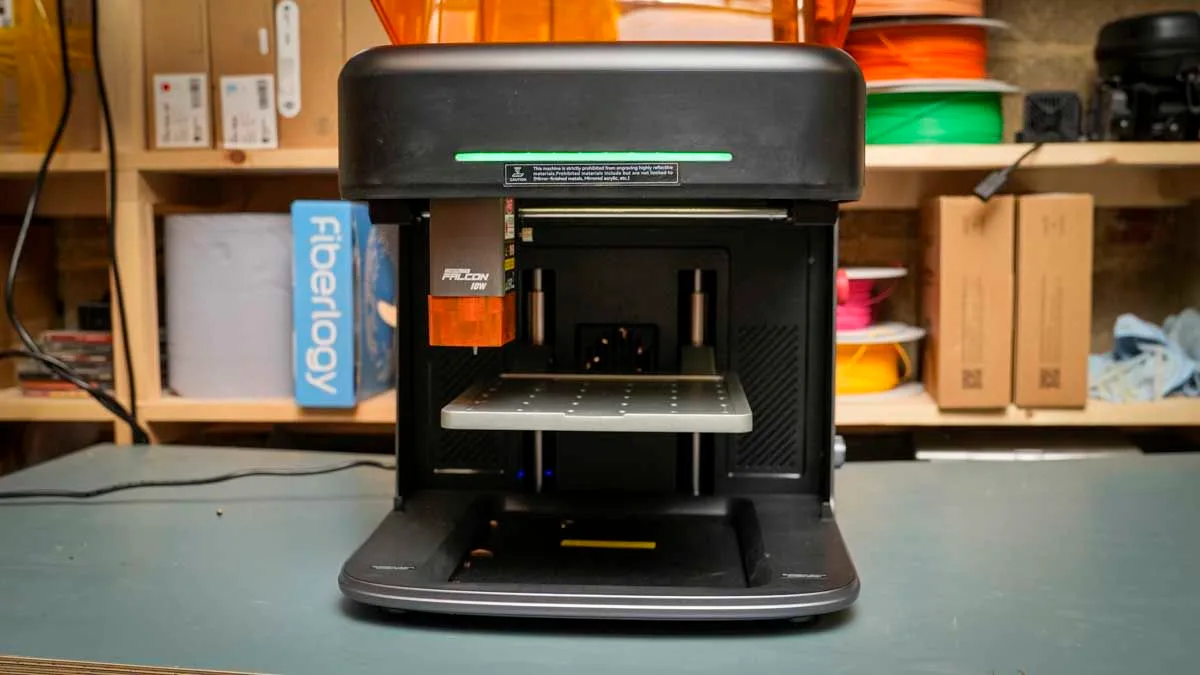
The Creality Falcon A1C is a compact, fully enclosed desktop laser engraver and a leap forward for affordable laser engraving in a format that's far safer than the open designs I often see at this price.
While it’s more affordable, with the full plastic build, it actually pulls many features from far more expensive machines, including the slightly larger Falcon A1.
Designed to sit on your desktop, it measures 336 x 377 x 341 mm, giving it an incredibly compact footprint.
Essentially, it's designed to be accessible and usable whenever you need it.
While the design aesthetics might not match that of some rivals' larger machines, the workflow and robust build make it an ideal option for education and small studios where you want to experiment with the technology to create items and even have small production runs.
In this review, I had access to the 10W version, and from unboxing to setup it took no longer than 10 minutes.
Activation required a single push of the button on the machine, then a few steps, and it was connected to the mobile app.
On the Mac, it took a few more steps, with the wired connection needed first before you can switch over to Wi-Fi, but in both cases it's one setup, and then you don't have to revisit it later.
When it comes to use, the Falcon Design Space software is once again well laid out, as I saw with the Falcon A1 and Falcon T1, and with a few sample designs I was able to cut directly onto the paper and the basswood supplied.
I was instantly impressed with the results, starting with the basic ruler sample.
I laid out five from the outset, and with an 18-minute engraving on the small sheet of 3mm ply, the results were actually incredibly impressive, with little scorching or burning, if any, visible.
After a month of using the machine on small projects, the engraving quality across a wide range of surfaces was consistently good, with the best results coming from wood and paper.
I also had to connect the A1C to the Bambu Lab air filter because I didn't have the Falcon one to use, but it worked perfectly with no issues.
So if you already have an air filter, it should work without the dedicated one from Creality.
5News aggregated this summary from the outlet’s public feed. The full article, with all the context, is on www.techradar.com — the content belongs to TechRadar.